ParentSquare
- 4.3
- Rating
- 1.00M
- Installs
- Free
- Price

 Analysis by App-foxy
ParentSquare is the kind of education app that becomes valuable through routine rather than excitement. I found its main purpose easy to understand: it gives schools and families a private place to communicate instead of scattering important messages across paper notices, unrelated email threads, and last-minute phone calls. My overall view is positive, but with an important qualification: it works best when a school has committed to using it consistently. When that happens, it can make family-school communication noticeably easier. When it does not, the app may feel like one more inbox to check.
Developed by ParentSquare, this free education app is designed for communication between schools and parents or guardians. It is available to an Everyone audience, and its long presence in the mobile market is reflected in its release history, beginning on January 31, 2015. The current version is 2.105.0, and it supports Android 7.0 or later. Those details make it accessible to many older devices, although the experience will still depend on how actively the school uses the platform.
How ParentSquare fits into everyday school communication
I find ParentSquare easiest to judge by asking whether it can become a dependable part of a family’s routine, rather than whether it has the most features. In this section, I’ll look at how a school-focused channel can reduce the small daily gaps between home and school, while keeping expectations realistic. That context also helps explain why the app’s value depends so much on the communication habits built around it.
You May Also Like

 Blood Strike: 2.5 Anniversary
Blood Strike’s Loadouts Turn Every Drop Into a Tactical Gamble
A close look at Blood Strike’s custom loadouts: how fast access to signature weapons reshapes its battle royale rhythm, rewards preparation, and narrows the gap between fights.

 Pandora - Music & Podcasts
Pandora’s Music Is Easy to Start, but Harder to Recover
Pandora’s strength is its low-effort path from a seed to a station. Its weak spot is how much confidence it asks you to place in connection, setup, and quiet recovery.

 8 Ball Pool
 Is Built on Rivalries, Rematches, and Routine
A close look at the rivalries, rematches, shared routines, and unanswered safety questions that turn a quick pool match into a persistent mobile community.

 Samsung Music
’s Quiet Strength Is Playing What You Already Own
Its reach comes less from spectacle than from dependable access to a personal library. That simplicity is both the app’s strongest retention engine and its ceiling.

 AccuWeather: Weather Radar
AccuWeather Review: A Quick, Clear Forecast for Everyday Decisions
For everyday plans, the best forecast is the one you can understand quickly. AccuWeather makes rain timing, radar, and local conditions easy to act on, with a few trade-offs.

 Hill Climb Racing
Why Hill Climb Racing Still Turns Crashes Into One More Run
A tiny car, a bumpy hill and one more upgrade: Hill Climb Racing keeps resurfacing because its simple chaos makes every near-miss feel personal.
More From Our News Desk



A central place for messages that normally get lost
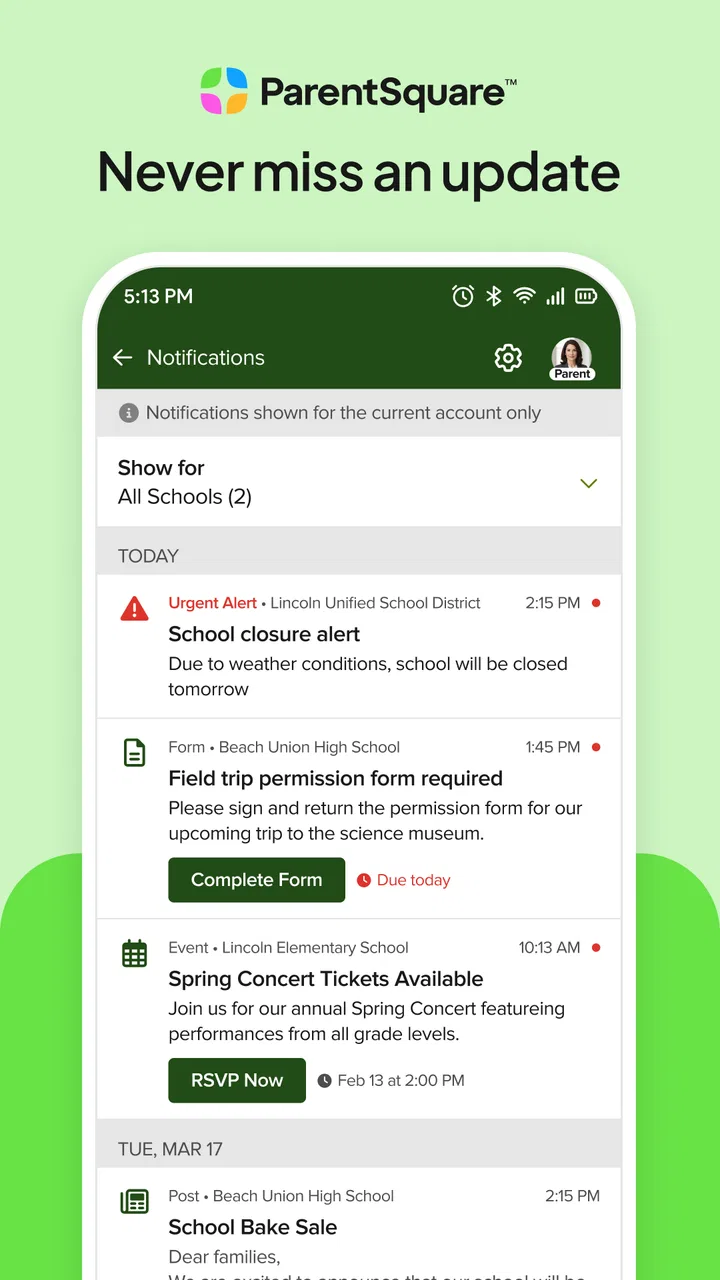
The strongest idea behind ParentSquare is consolidation. A school day can generate reminders about attendance, activities, forms, schedule changes, classroom news, and urgent notices. In a traditional setup, those messages might arrive through several channels, each with its own habits and problems. A note can stay inside a child’s backpack, an email can be buried, and a message sent to one parent may never reach another caregiver.
ParentSquare gives the school a dedicated communication environment. In my experience, that makes the app most useful as a dependable reference point. Rather than asking which email address received a notice or searching through a long conversation, I can return to the school’s communication space and review what was sent there. That simple change is more important than it sounds, especially for families managing multiple children or sharing responsibility between adults.
The private nature of the platform is also central to its appeal. This is not a public social network where families have to expose school-related conversations to a broad audience. The intended relationship is narrower: the school communicates with its community, and families receive information in a setting connected to that school. For parents who are uncomfortable mixing school matters with personal social media, that separation is a genuine advantage.
Useful when a family has different schedules
One realistic example is a household where one parent handles morning routines while another manages afternoon pickup. A school announcement about a changed activity time may be seen by one adult, but the other still needs access to the same information. A shared school communication channel reduces the need to forward every notice manually. It also helps when a guardian is at work during the school day and cannot respond immediately.
The app is particularly practical for families who do not want every school update to depend on a single person’s memory. If a child mentions that a permission form is due, the adult can check the original communication instead of relying on an incomplete retelling. That is a small but meaningful improvement in accuracy.
Why the adoption numbers matter, but not everything
ParentSquare has an average rating of 4.4 from around forty-two thousand ratings, with roughly thirteen thousand written reviews and more than one million installs. Those figures suggest that many people find the service useful enough to keep using, but they should not be mistaken for a guarantee of a smooth experience at every school. This app is partly a product and partly a communication system chosen by an institution. The school’s setup, message habits, and willingness to keep information current affect the experience just as much as the app itself.
That distinction is important when deciding whether to install it. A high rating cannot solve a school that posts irregularly, sends duplicate notices, or continues using several other channels at the same time. Conversely, a family may enjoy a very good experience even if the app itself feels fairly straightforward, simply because the school has made it the trusted place for updates.
The real strength is reliability of habit
I would not describe ParentSquare as an app that needs constant exploration. Its value comes from establishing a habit: check the school communication space, read the relevant update, and return when a detail needs confirming. That makes it less about discovering clever tools and more about reducing uncertainty.
For this reason, I recommend turning the app into part of a weekly family routine rather than relying only on alerts. Notifications are helpful, but a notification can be dismissed while someone is busy. A quick review of recent school messages at a convenient time is a better safeguard for families who frequently miss small announcements.
A second practical tip is to treat messages as records, not just alerts. When an update includes a time, location, or deadline, I would check it again before making plans. This avoids a common mistake with school communication: remembering the general idea correctly while forgetting the one detail that matters.
Where it compares well with ordinary alternatives
Compared with paper notices, ParentSquare is easier to revisit and less dependent on a child carrying information home. Compared with ordinary email, it offers a more school-focused destination instead of placing every announcement among work, shopping, and personal messages. Compared with social media groups, it is better suited to formal school communication because families do not need to rely on an informal community feed.
It is also a better fit than text messaging when the school needs a structured channel rather than a stream of short interruptions. Texts can be fast, but they are easy to overlook, especially when a parent receives many personal and professional messages. A school-specific app creates a clearer boundary around the information.
However, those comparisons do not mean ParentSquare replaces every alternative. Email may still be more convenient for detailed back-and-forth conversations or for families who already organize their schedules there. A phone call remains preferable for a sensitive issue that requires immediate personal attention. The app is strongest as a shared communication layer, not as a universal replacement for every form of contact.
The meaningful weakness: one more channel can become too many
The biggest limitation is not necessarily a missing feature; it is the risk of fragmented communication. If a school uses ParentSquare alongside email, paper, text messages, and separate classroom tools without clear rules, parents may wonder where the authoritative version of an announcement lives. Installing the app does not automatically simplify communication if the institution keeps sending the same information everywhere.
This can create notification fatigue. A family may receive several reminders about one event, then become less attentive to the next message. On the other hand, if notifications are reduced too aggressively, an important update may be missed. The best balance depends on how the school communicates and how carefully the household manages its alerts.
I also think the app can feel less helpful for parents who expect a full school-management system. Its core identity is communication. Someone looking for a comprehensive academic dashboard, a dedicated homework planner, or a replacement for every administrative service may find the experience narrower than expected. ParentSquare should be judged for keeping school and family connected, not for being an all-purpose education suite.
What families should clarify before relying on it
Before treating the app as the main source of school information, I would ask the school three practical questions. First, are all important announcements posted there, or are some still sent only through other channels? Second, should both parents or guardians create their own access, or does the school manage household connections in another way? Third, which messages require a response and which are simply informational?
These questions are more useful than comparing screenshots or counting features. The quality of the experience depends on the communication agreement around the app. A family should know whether it is expected to check ParentSquare daily, weekly, or only when an alert arrives. That expectation can prevent both missed notices and unnecessary anxiety.
It is also worth deciding who in the household will monitor school messages. In a busy family, responsibility can become vague: everyone assumes someone else saw the update. A simple agreement, such as assigning one adult to review notices each evening and share relevant details, makes the platform more effective without requiring constant attention from everyone.
Who will get the most from it
ParentSquare is a strong fit for parents and guardians whose schools actively use it as a primary communication channel. It is especially useful for households with several caregivers, changing work schedules, more than one child, or a history of misplaced paper notices. Families that prefer keeping school information separate from personal email and social media will also appreciate its focused purpose.
It can be valuable for parents who want a written point of reference. If a schedule changes or a school event is discussed later, having the original communication available is more dependable than relying on memory. That is one of the app’s quieter benefits: it supports coordination without requiring every family member to be present at the moment a message is sent.
The app is also approachable for people who are not especially comfortable with complicated technology. Since its purpose is narrow, users do not need to learn a large collection of unrelated tools before understanding why they should open it. The free price removes a financial barrier, which matters for families already managing school expenses.
Who should consider a different approach
I would be cautious about recommending ParentSquare as a standalone solution to a family whose school barely uses it. If teachers and administrators continue to communicate mainly through email, printed notices, or another established system, the app may add an extra check rather than remove one. In that situation, the most sensible choice is to follow the channel the school actually treats as official.
It may also be a poor fit for someone who wants instant personal interaction for every issue. A school communication platform can organize information, but it does not eliminate the need for direct contact when a matter is urgent, confidential, or too complicated for a general message. For those situations, a call or direct conversation is usually better.
Families who dislike notifications should not install it casually and ignore the settings. The app’s usefulness depends on seeing relevant communication, but constant alerts can become irritating. I would begin with the minimum notification level that still matches the school’s expectations, then adjust after observing how frequently meaningful updates arrive.
Details worth knowing before installation
ParentSquare is free, carries an Everyone content rating, and is published by ParentSquare. Its broad device compatibility is helpful for families using older Android phones, since the minimum operating system is Android 7.0. The current release, version 2.105.0, is the one I would look for when installing or updating.
Those technical details are reassuring, but the most important preparation is institutional rather than technical. A parent generally benefits from knowing whether the school has already invited the household, which email address or contact information is associated with the account, and whether more than one caregiver should be connected. Getting that relationship correct early prevents confusion later, particularly in households where several adults need access.
I would also avoid assuming that installing the app alone completes the setup. The school’s connection to the family is what makes the service useful. If the app opens but the expected school communication is not visible, the next step should be checking the school’s enrollment or contact process rather than concluding that the platform has no value.
My final assessment
After looking at ParentSquare as both a parent-facing app and a communication habit, I see a clear thesis: it is most successful when it replaces uncertainty with one dependable place to look. Its strengths are practical rather than flashy. It can keep notices from disappearing into backpacks, email clutter, or informal conversations, and it gives families a private channel that is easier to revisit than many everyday alternatives.
Its weakness is equally practical. The app cannot impose consistency on a school that communicates through too many competing channels, and it is not designed to replace every academic or administrative tool a family might want. Some users will find that limitation refreshing; others may expect a broader school-management experience.
My recommendation is straightforward: install ParentSquare when your school actively relies on it, then make it part of a simple household checking routine. For that audience, the free cost, broad accessibility, and focused communication purpose make it an easy choice. If your school rarely posts there or treats another channel as official, I would not depend on it as your only source of information. Used in the right environment, though, ParentSquare is a sensible education app that solves a very real everyday problem: helping families and schools stay aligned without making every message a scavenger hunt.
FAQs for ParentSquare
01What is ParentSquare and how does it work?
ParentSquare is a communication platform designed for schools to connect with parents, teachers, and students. It provides a centralized location for announcements, event reminders, and direct messaging. Users can access it via web or mobile app, ensuring they stay informed about school activities and updates.
02Is ParentSquare free to use for parents and students?
Yes, ParentSquare is generally free for parents and students to use. Schools typically purchase a subscription to provide access to their community, ensuring that families can benefit from the platform's features without incurring additional costs.
03What features does ParentSquare offer to enhance communication?
ParentSquare offers a variety of features such as announcements, event scheduling, RSVP capabilities, direct messaging, and attendance tracking. It also supports attachments like photos and documents, allowing for a comprehensive communication experience between schools and families.
04Can ParentSquare be used on both Android and iOS devices?
Absolutely, ParentSquare is available for both Android and iOS devices. Users can download the app from the Google Play Store or Apple App Store, providing easy access to school communications and updates directly from their smartphones or tablets.
05How does ParentSquare ensure the privacy and security of its users?
ParentSquare prioritizes user privacy and security by implementing strict data protection measures. It complies with FERPA regulations, ensuring that all communications and personal information are securely stored and accessible only to authorized users, maintaining a safe environment for school communications.
Pros
- Intuitive user interface for easy navigation.
- Real-time updates keep everyone informed.
- Comprehensive communication tools included.
- Secure platform ensures data privacy.
- Supports multimedia sharing for engagement.
Cons
- Limited customization options for users.
- Notification settings can be overwhelming.
- Requires internet access for full functionality.
- Some features may be redundant for small schools.
- Occasional syncing issues with calendars.

ParentSquare
Gallery